Ransomware can disrupt business operations by encrypting files, interrupting access to critical systems, and potentially exposing sensitive information. Recovery may involve restoring data, investigating how attackers gained access, and addressing weaknesses that allowed the incident to occur.
Learning how to prevent ransomware attacks starts with a combination of security controls, employee awareness, reliable backups, and a clear response plan. Small businesses do not need to implement every security measure at once, but they should identify their most important systems and build protection around them.
What Is Ransomware and Why Is It a Business Risk?
Ransomware is malicious software that prevents an organization from accessing its data or systems, often by encrypting files. Attackers may demand payment in exchange for a decryption key. Some also steal information and threaten to publish it if the organization does not meet their demands.
Paying a ransom does not guarantee that files will be restored or that stolen information will remain private. Businesses may also face downtime, recovery expenses, customer concerns, and legal or regulatory obligations depending on the incident and the information involved.
A ransomware incident can affect organizations of different sizes. Small businesses may have fewer dedicated IT and security resources, making preparation and early detection particularly important.
How Do Ransomware Attacks Reach Businesses?Understanding common attack methods helps organizations identify where to strengthen their defenses.
Phishing Emails and Malicious Attachments
Attackers may send emails that appear to come from customers, suppliers, executives, or trusted services. A malicious link, attachment, or fake sign-in page can expose credentials or introduce malware when an employee interacts with it.
Employee awareness training and a clear process for reporting suspicious messages help reduce this risk.
Stolen or Weak Credentials
Attackers may use stolen passwords or exploit accounts that lack adequate protection. If compromised credentials provide access to email, remote access tools, or administrative systems, an attacker may be able to move further into the environment.
Use strong, unique passwords and multi-factor authentication (MFA), particularly for email, administrator accounts, and remote access.
Unpatched Software and Exposed Systems
Outdated operating systems, applications, and internet-facing services may contain vulnerabilities that attackers can exploit. Unsupported software can create additional security challenges.
Maintain an inventory of business systems, apply security updates promptly, and remove or secure services that are no longer needed.
Compromised Remote Access
Remote desktop services, virtual private networks, and other remote access tools can become entry points when they are exposed or inadequately secured.
Restrict remote access to authorized users, use MFA, and review access permissions regularly.
What Are the Key Strategies for Ransomware Protection for Businesses?Effective ransomware protection for businesses uses multiple layers of defense. No single tool or procedure can eliminate every risk, so security measures should complement one another.
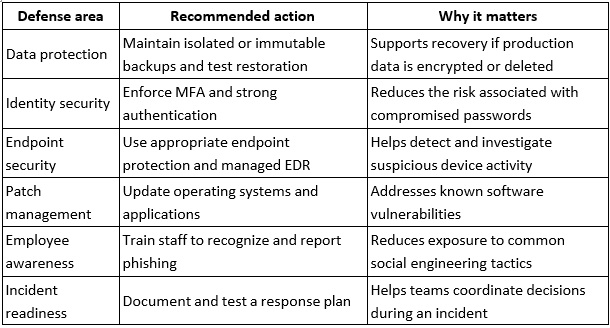
The appropriate controls depend on your systems, business risks, and operational requirements. Review them regularly as your organization changes.
How to Implement Ransomware Prevention Step by Step
Step 1: Protect and Test Your Backups
Backups are an essential part of ransomware recovery. Follow the 3-2-1 backup approach as a starting point: maintain three copies of important data, use two different types of storage media, and keep at least one copy off-site. Consider immutable or offline backups that attackers cannot easily alter or delete from compromised production systems.
The right backup arrangement depends on your environment and recovery requirements. Test restoration regularly to confirm that critical files and systems can be recovered. Define recovery priorities and establish how frequently important data needs to be backed up.
A backup is useful only if it is available, intact, and restorable when needed.
Step 2: Enforce Multi-Factor Authentication
Multi-factor authentication requires an additional verification step beyond a password. It can make account compromise more difficult when a password is stolen.
Enable MFA for business email, Microsoft 365, remote access, administrative accounts, and other important cloud services. Where possible, prioritize phishing-resistant authentication methods for accounts with elevated privileges.
Review account permissions and remove access that employees no longer need. Separate administrator accounts from everyday user accounts to reduce unnecessary exposure.
Step 3: Keep Systems and Software Updated
Security updates address known vulnerabilities that attackers may otherwise exploit. Establish a process for tracking devices, identifying unsupported software, applying patches, and verifying that updates have been installed successfully.
Prioritize internet-facing systems and vulnerabilities that pose significant risks to your business. If a system cannot be updated promptly, evaluate temporary mitigations or other measures to reduce exposure.
Routine patch management helps close known security gaps, although it cannot prevent every attack.
Step 4: Use Managed Endpoint Security and Monitoring
Endpoint security tools help protect laptops, desktops, and servers from malicious activity. Managed endpoint detection and response (EDR) can provide deeper visibility into suspicious behavior, support investigations, and enable response actions depending on the solution and its configuration.
Businesses should also understand who reviews alerts, how incidents are escalated, and who is responsible for taking action. Automated monitoring and human-led security investigation are related but distinct functions.
A well-defined process helps ensure that security alerts receive appropriate attention.
Step 5: Train Employees to Recognize Threats
Employees should know how to identify suspicious emails, unexpected attachments, unusual login requests, and payment or account-change instructions that require verification.
Training should explain how to report a suspected phishing attempt and what to do if someone clicks a suspicious link or shares credentials. Encourage prompt reporting without blame so that the IT team can investigate quickly.
Consider periodic exercises and refresher training to reinforce these practices.
Step 6: Restrict Access and Secure Remote Connections
Apply the principle of least privilege by giving users access only to the systems and information needed for their roles. Review permissions when employees change responsibilities or leave the company.
Secure remote access with MFA, approved devices, appropriate access restrictions, and monitoring. Disable unused accounts and services, and review administrative privileges regularly.
These measures can limit opportunities for an attacker to access additional systems if one account or device is compromised.
Step 7: Create and Test an Incident Response Plan
A ransomware response plan should identify who makes decisions, who contacts IT and security providers, how incidents are escalated, and how business operations will be prioritized.
Include procedures for isolating affected systems, preserving relevant evidence, assessing the scope of an incident, contacting appropriate specialists, and restoring systems from
verified backups. The plan should also identify when legal counsel, insurers, law enforcement, or relevant regulators may need to be involved.
Test the plan periodically so employees understand their responsibilities before an incident occurs.
What Should Your Business Do if a Ransomware Attack Occurs?If you suspect ransomware, prioritize containment, investigation, and safe recovery.
1. Activate your incident response process. Contact your IT or security provider and the designated incident lead.
2. Isolate affected devices when appropriate. Disconnect compromised systems from networks to limit further spread, following guidance from your response team. Avoid actions that could unnecessarily destroy evidence.
3. Protect other accounts and systems. Follow incident response guidance to secure potentially compromised credentials and assess whether additional devices or services are affected.
4. Preserve evidence. Keep relevant alerts, logs, messages, and other records for investigation. Avoid wiping affected systems before appropriate evidence has been collected.
5. Assess the incident. Determine which systems and information may be affected and whether data was accessed or exfiltrated.
6. Coordinate communications. Involve relevant technical, legal, insurance, and business stakeholders. Notification requirements depend on the circumstances and applicable laws.
7. Restore carefully. Verify that the cause has been addressed and that backups are suitable before restoring systems. Monitor restored environments for further suspicious activity.
Do not assume that paying a ransom will restore your systems or resolve the incident. Decisions about ransom demands require careful consideration of legal, operational, security, and insurance implications.
How BBComputing Supports Business CybersecurityBBComputing provides managed IT services for small businesses, typically organizations with 3 to 50 employees. Based in Chicago, the company supports clients across the country.
Its services include managed endpoint detection and response (EDR) and identity threat detection for Microsoft 365 accounts, backed by a 24/7 security operations center (SOC) that investigates and responds to threats. BBComputing also provides 24/7 automated monitoring of managed devices.
Its helpdesk operates Monday through Friday, 8 a.m. to 5 p.m. Central, with after-hours escalation for urgent issues. Security awareness training and Microsoft 365 backup are also available.
Ransomware prevention requires a combination of technology, sound operating practices, and preparation for incidents. Contact BBComputing to set up a review of your environment and identify appropriate next steps.
Frequently Asked QuestionsWhat is the most effective way to prevent ransomware attacks?
There is no single measure that prevents every attack. A layered approach that includes MFA, regular patching, endpoint security, employee training, restricted access, reliable backups, and an incident response plan can reduce risk and improve recovery readiness.
How often should a business back up its data?
Backup frequency should reflect how much data the business can afford to lose and how quickly it needs to recover. Critical systems may require more frequent backups than less important data. Regularly test restoration and keep protected backup copies separate from production systems.
Can antivirus software stop ransomware?
Antivirus software can detect and block many threats, but its effectiveness depends on the product, configuration, and attack method. Endpoint detection and response can add behavioral visibility and investigation capabilities. Neither approach guarantees that every ransomware attack will be prevented.
What should a business do immediately after detecting ransomware?
Activate the incident response plan, contact the appropriate IT or security provider, and isolate affected systems when advised to limit further spread. Preserve relevant evidence and avoid restoring from backups until the environment has been assessed and the recovery process is coordinated.
Should a business pay a ransomware demand?
Payment does not guarantee data recovery or prevent stolen information from being disclosed. Before making any decision, seek appropriate legal, cybersecurity, and insurance guidance and consider applicable laws and sanctions requirements.
Can remote desktop access increase ransomware risk?
Poorly secured remote access can provide attackers with an entry point. Use MFA, restrict access to authorized users and devices, keep remote access software updated, and monitor activity for suspicious behavior.
Build a Practical Ransomware Prevention PlanStrong ransomware prevention begins with understanding your business's most important systems, protecting access to them, maintaining recoverable backups, and establishing a clear process for responding to suspicious activity.
Review your controls regularly and test whether your organization can respond effectively if an incident occurs. For small businesses seeking managed IT support and SOC-backed endpoint security, BBComputing can help assess their requirements and discuss suitable services.