
Cyber insurance can help businesses manage certain financial risks associated with cyber incidents, but obtaining and maintaining a policy may require attention to IT security practices. Insurers may ask about access controls, endpoint protection, data backups, software updates, employee training, and incident response procedures when evaluating an application or renewal.
Understanding cyber insurance requirements helps small businesses identify security gaps, prepare accurate application responses, and maintain appropriate safeguards.
Requirements vary by insurer, policy, business size, industry, and risk profile, so organizations should review their specific policy documents rather than assume every control applies universally.
What Do Cyber Insurance Providers Look For?
Cyber insurance applications often include questions about how a business protects its systems and sensitive information. Depending on the policy and underwriting process, an insurer may ask whether the organization uses multi-factor authentication, maintains backups, applies security updates, monitors endpoints, and has a documented incident response plan.
Insurers may also ask about previous incidents, third-party service providers, remote access, and the types of information the business handles.
The answers help an insurer evaluate the organization's risk. Some controls may be required for a particular policy, while others may affect eligibility, coverage terms, deductibles, or premiums. The precise consequences depend on the insurer and policy wording.
Businesses should answer application questions accurately and verify that the stated controls are actually implemented. If a security measure is incomplete, identify the gap and discuss it with the insurance representative instead of claiming compliance without evidence.
Common Cyber Insurance Cybersecurity Requirements
Although requirements differ, several security practices commonly deserve attention when preparing for cyber insurance.
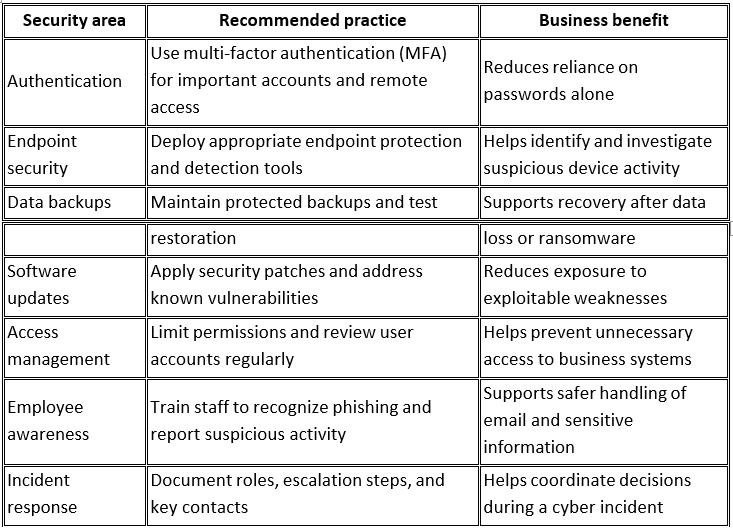
This checklist is a starting point, not a universal list of mandatory insurance controls. Confirm the requirements that apply to your policy and business.
Why Multi-Factor Authentication MattersStolen credentials can expose business email, cloud applications, financial systems, and remote access services. Multi-factor authentication adds a verification step beyond a password, making it harder for someone to access an account using only stolen login details.
When reviewing cyber insurance cybersecurity requirements, pay particular attention to authentication controls for administrator accounts, business email, remote access, and other critical services. Insurers may specify particular accounts or systems that must use MFA.
Businesses should also use strong, unique passwords, review access permissions, and remove accounts when employees no longer need them. Where supported, phishing-resistant authentication can provide additional protection against credential theft.
Do not assume that enabling MFA on one application satisfies every requirement. Check the insurer's application and policy terms for the precise scope.
Endpoint Security and Threat DetectionEndpoint security helps protect devices such as laptops, desktops, and servers. Depending on the product, traditional antivirus and more advanced endpoint detection and response (EDR) tools can identify suspicious files or behavior and support investigation and response.
Some insurers may ask about EDR or other endpoint security controls. However, it would be inaccurate to say that every carrier requires the same product or that antivirus is automatically unacceptable for every policy. The applicable requirements should be confirmed with the insurer or broker.
Businesses should also understand who reviews security alerts and how potential incidents are handled. Technology can generate alerts and support response actions, but effective security also depends on configuration, monitoring, investigation, and a clear escalation process.
Backups, Ransomware Preparedness, and RecoveryBackups are an important part of business continuity. Ransomware and other incidents can make production data unavailable, damage systems, or affect information stored on connected resources.
Businesses should maintain backups appropriate to their recovery needs, protect them from unauthorized access or alteration, and test restoration regularly. Keeping a protected copy separate from the primary environment can help reduce the risk that one incident affects both production data and backups.
Some policies may specify backup, retention, or recovery practices. Others may assess these controls as part of the overall risk evaluation. Review the applicable policy terms instead of assuming a particular backup arrangement is mandatory for every business.
A recovery plan should identify critical systems, responsible personnel, restoration priorities, and the steps required to verify systems before returning them to normal operation.
Software Updates and Vulnerability ManagementOutdated software can contain known vulnerabilities that attackers may exploit. A structured patch management process helps businesses identify systems that need updates and prioritize remediation.
A practical process includes:
• Maintaining an inventory of devices, operating systems, and important applications.
• Applying security updates according to risk and urgency.
• Replacing or mitigating unsupported software where necessary.
• Reviewing exposed services and restricting access where appropriate.
• Keeping records of updates, exceptions, and remediation work.
Some cyber insurance applications ask about patching practices, unsupported systems, or vulnerability management. Be prepared to explain how your business handles these tasks and how exceptions are managed.
Regular maintenance reduces avoidable exposure, but it does not eliminate every security risk.
A written incident response plan helps a business coordinate its actions if it experiences a cyber incident. It should identify who leads the response, who contacts IT or security providers, how affected systems are assessed, and how business operations are prioritized.
The plan should also cover evidence preservation, communications, backup restoration, and escalation to legal counsel, insurers, or other relevant parties when appropriate.
Depending on the policy, an insurer may ask whether an incident response plan exists or whether the organization has procedures for reporting incidents. Businesses should review their policy for notification deadlines and claim reporting instructions. These obligations can vary, and missing a contractual deadline may have consequences.
Useful documentation can include security policies, backup test records, employee training records, patch management procedures, and incident response contacts. Keep records accurate and current, and ensure that they reflect the controls actually in place.
How to Prepare for Cyber Insurance Requirements Step by StepStep 1: Review the Application and Policy
Start with the insurer's actual questions, underwriting guidance, and policy documents. Identify which controls are required, which are recommended, and which need further clarification from the insurer or broker.
Do not rely on a general online checklist as a substitute for reviewing your own policy.
Step 2: Assess Your Current IT Security
Review authentication, endpoint protection, backups, software updates, remote access, user permissions, and incident response procedures. Record what is already implemented, what is incomplete, and who is responsible for each area.
This assessment helps prioritize improvements rather than treating every possible security measure as equally urgent.
Step 3: Address Important Gaps
Prioritize gaps based on business risk and any specific requirements identified by the insurer. This may include enabling MFA, improving backup protection, updating vulnerable systems, or clarifying who responds to security alerts.
If a requirement is unclear or cannot be met immediately, discuss the situation with the insurance representative before submitting an inaccurate application.
Step 4: Keep Evidence of Your Controls
Maintain practical records of security measures and their ongoing operation. These might include MFA settings, backup test results, patch records, training completion, and documented incident response procedures.
Documentation can make it easier to answer underwriting questions and demonstrate how security practices are maintained.
Step 5: Revisit Security and Policy Requirements Regularly
IT environments change as businesses add employees, adopt cloud services, and introduce new devices. Insurance terms and application questions may also change at renewal.
Review security controls periodically and reassess them when there are significant changes to your business or technology. If your organization changes a control that was represented in an application, confirm whether the insurer needs to be notified.
How BBComputing Supports Small Business IT SecurityBBComputing provides managed IT services for small businesses, typically organizations with 3 to 50 employees. Based in Chicago, the company supports clients across the country.
Its services include managed endpoint detection and response (EDR) and identity threat detection for Microsoft 365 accounts, backed by a 24/7 security operations center (SOC) that investigates and responds to threats. BBComputing also provides 24/7 automated monitoring of managed devices.
Its helpdesk operates Monday through Friday, 8 a.m. to 5 p.m. Central, with after-hours escalation for urgent issues. Security awareness training and Microsoft 365 backup are also available.
Contact BBComputing to set up a review of your environment. Our services can support a business's broader IT security efforts, but the suitability of any service for a particular insurance requirement should be checked against the insurer's terms. Businesses should confirm the scope of coverage, responsibilities, and documentation available for the services they use.
BBComputing can help small businesses discuss their managed IT and endpoint security needs, review their existing environment, and identify appropriate next steps. Insurance eligibility, coverage decisions, and claim outcomes remain subject to the insurer's underwriting and policy terms.
Frequently Asked QuestionsWhat happens if a business does not meet its cyber insurance requirements?
The consequences depend on the application, policy wording, and the specific requirement. A business may face additional questions, revised terms, difficulty obtaining coverage, or other consequences. Inaccurate application statements or failure to meet policy conditions may also affect coverage or a claim. Contact the insurer or broker to understand the implications of a specific gap.
Is antivirus enough for cyber insurance?
There is no single answer for every policy. Some insurers may ask about EDR or other advanced endpoint security measures, while requirements differ across providers and businesses. Review the insurer's questions and policy terms to determine which controls apply.
Why might an insurer require multi-factor authentication?
MFA adds a verification step beyond a password and can reduce the risk of unauthorized account access using stolen credentials. An insurer may specify MFA for certain systems or accounts as part of its underwriting requirements. Confirm the scope with your provider.
How often should a business test its backups?
The frequency should reflect the importance of the data, recovery objectives, and the business's operational needs. Test restoration regularly and document the results. If your policy specifies a particular backup or testing requirement, follow the applicable terms.
Does every small business need an incident response plan for cyber insurance?
Requirements vary by insurer and policy. Regardless of whether a plan is expressly required, documenting incident roles, contacts, escalation procedures, and recovery steps is a practical security measure for small businesses.
Keep Your IT Security Aligned With Your Business NeedsCyber insurance requirements can influence how small businesses manage authentication, endpoint security, backups, software updates, and incident response. The best starting point is to understand the controls that apply to your specific policy, assess your current environment, and address gaps in a structured way.
Review your security practices regularly and keep your documentation aligned with what is actually implemented. For small businesses looking for managed IT support and SOC-backed endpoint security, BBComputing can help assess IT needs and discuss relevant services while you confirm insurance-specific requirements with your insurer or broker.