
Choosing an IT provider is an important business decision. The right partner can help your team manage technology, address recurring issues, strengthen cybersecurity, and plan for growth. However, providers differ in their service offerings, support hours, security capabilities, pricing, and contractual commitments.
Before signing an agreement, ask specific questions about what the provider will deliver, how support requests are handled, and what happens when your business needs change. Knowing the right questions to ask an IT provider helps you compare options, identify gaps, and choose a service arrangement that fits your business.
1. What Support Is Included, and When Is It Available?
Start by understanding how the provider handles everyday technical issues and urgent incidents. A service agreement should explain the available support channels, operating hours, escalation procedures, and response-time commitments.
Ask questions such as:
· What are your standard helpdesk hours?
· How do employees submit and track support requests?
· How are urgent issues handled outside standard business hours?
· Are response-time targets different for routine requests and critical incidents?
· Which systems, users, and devices are covered?
· Are remote support and onsite visits included, or billed separately?
Pay particular attention to the difference between helpdesk support and monitoring. Automated monitoring can identify certain device or system issues, but it is not the same as a technician being available to answer a support request. Similarly, 24/7 security operations do not automatically mean a provider offers 24/7 helpdesk or phone support.
Get the provider’s support hours and escalation process in writing so your team knows what to expect.
2. How Will You Manage Cybersecurity and Respond to Threats?
Cybersecurity should be a core part of your IT review. Ask the provider which protections are included, which require separate services, and how security alerts are investigated.
Useful questions to ask an MSP include:
· Do you provide managed endpoint detection and response (EDR)?
· How are Microsoft 365 accounts and user identities protected?
· Is security monitoring supported by a security operations center (SOC)?
· Who investigates and responds to security alerts?
· Is employee security awareness training available?
· What happens if a device or account is suspected of being compromised?
· Which security services are included in the agreement?
A provider’s proposal should describe the actual tools and services it will manage rather than relying on broad promises such as “complete protection.” No security product or service can eliminate every risk, so it is important to understand how detection, investigation, escalation, and response work together.
Here is a practical comparison of security controls to discuss with a potential provider:
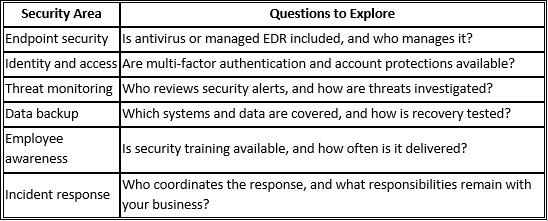
Do not assume that every item is included in a standard managed IT plan. Ask the provider to identify what is covered, what costs extra, and what responsibilities remain with your team.
3. How Is Pricing Structured, and What Costs Extra?
IT pricing can vary according to the number of users and devices, the services included, security requirements, and the level of support. Some providers use per-user or per-device pricing, while others offer different packages or custom agreements.
Ask these managed IT provider questions before committing:
· Is pricing calculated per user, per device, or through another model?
· Which services are included in the recurring fee?
· Are software licenses, hardware, and third-party subscriptions included?
· Are onboarding, migrations, onsite visits, or major projects billed separately?
· How are additional users and devices priced?
· Can fees change during the contract term?
· What notice is required for pricing changes?
Request a written breakdown of recurring and additional costs. Review the exclusions as carefully as the included services. For example, a monthly service fee may cover routine IT management but not new hardware, major infrastructure upgrades, or a large office relocation.
A clear agreement helps your business budget accurately and reduces the likelihood of disagreements about out-of-scope work.
4. What Does the Contract Say About Service Levels and Accountability?
A service-level agreement (SLA), where provided, describes the service commitments the provider agrees to meet. It may define response targets, support priorities, availability commitments, reporting, and escalation procedures.
Before signing, ask:
· Are response times defined by issue priority?
· Does the SLA measure the time to acknowledge a request, begin work, or resolve it?
· How are unresolved or recurring issues escalated?
· What reporting will we receive?
· What happens if a documented service commitment is missed?
· Are any remedies or service credits specified in the agreement?
Read the exact wording rather than relying on verbal assurances. A response-time target is not necessarily a resolution-time guarantee. Complex incidents may take longer to resolve, depending on their cause and the systems involved.
Also review the agreement’s exclusions and dependencies. For example, a provider’s ability to restore a system may depend on backup coverage, access to third-party services, and the condition of the underlying infrastructure.
5. How Will You Handle Backups and Recovery?
Data loss can result from accidental deletion, hardware failure, software problems, or a cybersecurity incident. A provider should be able to explain how backup and recovery responsibilities are handled.
Ask:
· Which devices, applications, and business data are included in the backup plan?
· How frequently are backups performed?
· Where are backup copies stored?
· How long are backups retained?
· How often is recovery tested?
· Who is responsible for initiating recovery after an incident?
· Are backup storage, monitoring, and recovery services included in the agreement?
Do not assume that every device or application is backed up simply because a provider offers backup services. Confirm the coverage in writing and identify any systems that require separate protection.
If your business relies on Microsoft 365, ask specifically about the backup arrangements for the relevant services and data. Native retention features and dedicated backup services may serve different purposes, so the provider should explain what its proposed setup covers.
6. Can Your Services Scale With Our Business?
Your technology needs may change as you hire employees, add devices, open locations, or introduce new applications. An IT provider should be able to explain how these changes affect service delivery and costs.
Ask potential providers:
· How are new employees and devices added to the service?
· Can you support remote and hybrid employees?
· How are onboarding and offboarding managed?
· What happens when our business adds a location or changes its software?
· Are technology planning and project work included?
· How are changes in service scope documented and priced?
A provider should explain how it manages growth without promising that every change will be covered by the existing fee. Major migrations, new systems, and infrastructure projects may require separate planning and pricing.
Look for a provider that can discuss your current environment, likely future needs, and practical next steps rather than recommending tools without understanding your business.
7. What Is Included in Onboarding and Ongoing Management?
Switching IT providers requires coordination. The new provider may need to document devices and applications, review existing security controls, establish support processes, and coordinate access to systems managed by the previous provider.
Clarify the onboarding process before signing.
Ask:
· What information and access will you need from us?
· Will you document our devices, applications, and IT environment?
· How will you coordinate the transition from our current provider?
· Will employees receive instructions for requesting support?
· How will outstanding issues and known risks be communicated?
· What ongoing reviews or reporting are included after onboarding?
Onboarding timelines depend on the size and complexity of the environment, the quality of existing documentation, and how quickly required access is provided. Ask for a proposed timeline and a list of responsibilities rather than relying on a generic estimate.
8. What Are the Contract Term, Renewal, and Exit Conditions?
Service quality matters, but so do the terms that govern the relationship. Before committing, understand how long the agreement lasts and what happens if either party wants to end or change it.
Review the following:
· Initial contract term and renewal conditions.
· Notice periods for cancellation or non-renewal.
· Any early termination fees or other exit costs.
· How price and service changes are approved.
· Who owns business data, configurations, and documentation.
· How administrative credentials and data are transferred at the end of the relationship.
· Any assistance available during the transition to another provider.
Ask for the relevant terms in writing and make sure they align with your business requirements. Pay particular attention to access to your own systems and data, since a provider transition should include a clear process for transferring the information your business needs.
A Quick Checklist Before Signing an IT Agreement
Use this checklist to compare proposals from different providers:
Support hours, channels, and escalation procedures are documented.
Response-time commitments and issue priorities are clear.
Included cybersecurity services and exclusions are identified.
Backup coverage and recovery responsibilities are defined.
Recurring fees and additional charges are explained.
Onboarding responsibilities and the transition plan are documented.
Processes for adding users, devices, and locations are clear.
Contract term, renewal, and termination conditions have been reviewed.
Data ownership, access, and exit arrangements are addressed.
Reporting and ongoing communication expectations are agreed upon.
Comparing providers against the same checklist makes it easier to identify differences that may not be obvious from the headline price alone.
Discuss Your IT Requirements With BBComputing
BBComputing provides managed IT services for small businesses, typically those with 3 to 50 employees. Based in Chicago and serving clients across the country, the company helps businesses manage their technology and address security needs through a defined set of services.
Its service capabilities include:
· Helpdesk support Monday through Friday, 8 a.m. to 5 p.m. Central, with after-hours escalation for urgent issues.
· 24/7 automated monitoring of managed devices.
· Managed endpoint detection and response (EDR) and identity threat detection for Microsoft 365 accounts, backed by a 24/7 security operations center that investigates and responds to threats.
· Security awareness training.
· Microsoft 365 backup availability.
· Microsoft partner expertise.
Contact BBComputing to set up a review of your environment and see how the proposed services align with your needs and which items will be included in your agreement. Clear expectations around support, cybersecurity, pricing, and responsibilities help establish a productive working relationship.
Visit BBComputing to learn more about its managed IT services and discuss your business’s technology requirements.
Frequently Asked Questions
What are the main questions to ask an IT provider before hiring?
Ask about support hours, response-time commitments, cybersecurity services, backup coverage, pricing, onboarding, scalability, and contract terms. Request written details about included services, exclusions, and escalation procedures so you can compare providers accurately.
Why is a service-level agreement important?
An SLA documents specific service commitments, which may include response targets, issue priorities, availability expectations, and escalation procedures. Review what each metric measures and whether the agreement specifies any remedies when a commitment is missed.
How can I tell whether an MSP's pricing is transparent?
Transparent pricing clearly identifies the recurring fee, included services, exclusions, additional charges, onboarding costs, and how pricing changes when your business adds users or devices. Ask for unclear items to be explained in writing before signing.
What cybersecurity services should an IT provider offer?
The right services depend on your business, risks, and existing environment. Areas to discuss include endpoint protection, identity security, multi-factor authentication, security monitoring, employee awareness training, backup, and incident response. Confirm which services are included rather than assuming all providers offer the same protections.
How long does onboarding with a new IT provider take?
The timeline depends on the number of users and devices, system complexity, existing documentation, security requirements, and access to current systems. Ask for an onboarding plan that outlines milestones, responsibilities, and any dependencies that could affect the schedule.
Should I choose the cheapest managed IT provider?
Not based on price alone. Compare the service scope, security capabilities, support coverage, response commitments, exclusions, and contract terms. A lower fee may not include services your business needs, while a higher fee is only worthwhile if the added services align with your requirements.
Can I change IT providers if the service is not a good fit?
That depends on the contract’s term, cancellation provisions, notice requirements, and any applicable exit fees. Before signing, review how data, credentials, documentation, and administrative access will be transferred if the relationship ends.