
A business relies on its technology every day, from employee computers and Microsoft 365 accounts to network infrastructure and business applications. When these systems need maintenance, troubleshooting, or security attention, having clearly defined IT support makes a difference.
A managed IT services agreement outlines the responsibilities of a managed service provider (MSP) and the business it supports. It explains which systems are covered, what services are included, how support requests are handled, and how the relationship operates.
For small businesses without a dedicated internal IT department, a well-defined managed IT service agreement helps establish clear expectations and provides a framework for ongoing technology management.
What Is a Managed IT Services Agreement?
A managed IT services agreement is a contract between a business and an IT service provider. It defines the services the provider will deliver and the responsibilities both parties have throughout the engagement.
Depending on the arrangement, the agreement may cover device management, helpdesk support, software maintenance, cybersecurity, account administration, monitoring, and backup services.
The agreement should explain the scope of work rather than relying on general descriptions such as “complete IT support.” Businesses need to understand which devices and users are covered, what happens when a request falls outside the agreed scope, and how urgent issues are escalated.
A clear agreement also helps businesses evaluate providers on comparable terms. When the services, support hours, security responsibilities, and additional costs are documented, decision-makers can make a more informed choice.
Key Parts of an MSP Service Agreement
Although every business has different requirements, most managed IT agreements should address several important areas.
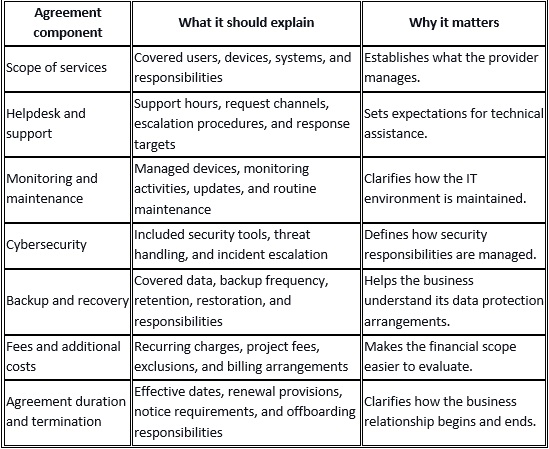
Review each section carefully before signing. If an important responsibility is unclear, ask the provider to document the answer in the agreement.
What Core Services May Be Included?
The exact services depend on the agreement. The following are common components to review when evaluating an MSP.
Proactive Monitoring and Routine Maintenance
Managed IT providers can monitor covered devices and use management tools to identify issues such as storage limitations, device health problems, software errors, and other performance concerns.
Monitoring helps identify conditions that may require attention before they become more disruptive. Routine maintenance may also include software updates, device configuration, and other tasks defined in the service scope.
Ask which devices are monitored, what conditions generate alerts, and how identified issues are prioritized and handled.
Helpdesk and Technical Support
Helpdesk services give employees a defined process for reporting technical problems and requesting assistance. Depending on the agreement, support may include troubleshooting software issues, resolving account access problems, assisting with Microsoft 365, and addressing everyday computer or connectivity concerns.
The agreement should identify the helpdesk schedule, available support channels, and escalation process for urgent issues. It should also explain whether on-site visits are included or arranged separately.
Response targets and resolution times are not necessarily the same. A response target describes when a provider aims to acknowledge or begin handling a request, while resolution depends on the nature of the problem, its priority, and any third-party dependencies.
Cybersecurity and Threat Response
Cybersecurity coverage can include antivirus or endpoint protection, managed endpoint detection and response (EDR), identity threat detection, email security, and security awareness training.
These services perform different roles. Endpoint tools help identify suspicious activity on managed devices, while identity security helps detect threats involving user accounts and sign-in activity. Security awareness training helps employees recognize phishing attempts and other common risks.
For managed EDR and identity threat detection, ask whether a security operations center (SOC) investigates alerts and responds to threats, what response actions are available, and how incidents are communicated to the business.
Also confirm which security services are included in the agreement and whether any additional tools or licensing are required.
Data Backup and Recovery
Backup services help businesses maintain copies of important information so that data may be restored following accidental deletion, hardware failure, or certain security incidents.
A backup agreement should identify the data covered, backup frequency, retention periods, storage arrangements, and restoration responsibilities. Businesses should also understand how restoration is tested and what recovery time and recovery point objectives apply, if these are defined.
Microsoft 365 backup deserves specific attention. Businesses should not assume every type of Microsoft 365 data is covered by default. Confirm which services and data are included and how restoration requests are handled.
Backups are an important part of recovery planning, but successful restoration depends on the backup configuration, the condition of the data, and the circumstances of the incident.
Microsoft 365 and User Account Management
Many small businesses rely on Microsoft 365 for email, collaboration, file sharing, and day-to-day operations.
Depending on the agreed scope, IT management may include user onboarding and offboarding, account permissions, licensing administration, and assistance with Microsoft 365 applications. Identity threat detection may also help identify suspicious activity involving Microsoft 365 accounts.
The agreement should distinguish routine account administration from additional projects, licensing purchases, and specialized security work.
What May Fall Outside a Managed IT Agreement?
Managed IT services do not automatically include every technology expense or project. Businesses should review exclusions and additional charges before signing.
Hardware Purchases and Major Infrastructure Projects
Routine device management does not necessarily include the purchase of replacement computers, servers, network equipment, or other physical hardware.
Major infrastructure upgrades, new office installations, server migrations, and large-scale equipment deployments may require separate project planning and pricing. The agreement should explain how these requests are scoped and approved.
Office Relocations and Specialized Projects
Moving an office can involve equipment transportation, network setup, connectivity coordination, workstation configuration, and other tasks beyond routine support.
Similarly, custom software development, complex application integrations, and specialized migrations may fall outside the standard service scope. Confirm how project work is estimated, authorized, and billed before it begins.
Third-Party Software and Licensing
Software subscriptions, cloud services, hardware warranties, and third-party vendor charges may be separate from managed IT fees.
Clarify which licenses and subscriptions the provider supplies or manages, who is responsible for renewal, and how third-party technical issues are coordinated.
How to Review a Managed IT Service Agreement
Before signing an MSP service agreement, use this checklist to evaluate the proposed arrangement.
· Confirm the inventory: Check that the users, devices, servers, applications, and locations to be managed are identified accurately.
· Review support arrangements: Verify helpdesk hours, support channels, escalation procedures, and any response targets.
· Understand security coverage: Identify the included endpoint, identity, email, and other security services, along with incident investigation and response responsibilities.
· Check backup arrangements: Confirm which data is covered, how frequently it is backed up, how long copies are retained, and how restoration is handled.
· Review the financial terms: Understand recurring fees, onboarding costs, project charges, third-party expenses, and exclusions.
· Read renewal and termination provisions: Check applicable dates, notice requirements, data access, documentation, and offboarding responsibilities.
· Ask about reporting: Determine what information the provider supplies about device health, security activity, completed work, and outstanding issues.
A thorough review helps prevent misunderstandings and ensures the arrangement reflects the business's actual IT requirements.
Managed IT Services for Small Businesses From BBComputing
BBComputing provides managed IT services for small businesses, typically those with 3 to 50 employees. Based in Chicago, the company supports clients across the country and helps businesses manage their technology, devices, user access, and cybersecurity.
Its helpdesk operates Monday through Friday, from 8 a.m. to 5 p.m. Central, with after-hours escalation for urgent issues. BBComputing also provides 24/7 automated monitoring of managed devices.
For cybersecurity, BBComputing's managed endpoint detection and response (EDR) and identity threat detection for Microsoft 365 accounts are backed by a 24/7 security operations center that investigates and responds to threats. Security awareness training and Microsoft 365 backup are also available. BBComputing is a Microsoft partner.
When evaluating a managed IT services agreement, businesses should make sure their provider's responsibilities match their day-to-day needs and security priorities. A clearly defined service scope, established support procedures, and appropriate security coverage give both parties a practical foundation for managing business technology.
Looking for managed IT services for your business? Visit BBComputing to learn more about its services and discuss your IT management requirements.
Frequently Asked Questions
How long does a managed IT services agreement last?
The duration depends on the provider and the terms negotiated. Review the agreement for its effective date, initial term, renewal provisions, notice requirements, and termination conditions rather than assuming a standard contract length.
Can a business add employees or devices after signing?
This depends on the agreement and the provider's onboarding process. Ask how new employees, devices, locations, and applications are added, how quickly they can be brought into scope, and whether the changes affect service fees.
What happens if an IT provider misses a response target?
The agreement should explain the applicable service targets, how performance is measured, and whether any remedies apply. Do not assume missed targets automatically result in service credits or other compensation unless the contract explicitly provides for them.
Does a managed IT agreement include hardware replacement?
Not necessarily. Some agreements cover management and troubleshooting but exclude the purchase of physical hardware. Check the scope and any hardware purchasing, warranty, or replacement arrangements.
Does managed IT include 24/7 support?
Support arrangements vary by provider. Review the actual helpdesk hours and escalation procedures in the agreement. Security operations coverage is a separate consideration: a provider may offer 24/7 threat investigation and response through a SOC without operating a 24/7 helpdesk.
What is the difference between break-fix support and managed IT?
Break-fix support generally addresses problems as they occur, with charges based on the applicable service arrangement. Managed IT provides ongoing management of agreed systems, which may include monitoring, maintenance, helpdesk support, and cybersecurity services. The exact coverage depends on the agreement.