Small businesses rely on email, cloud applications, connected devices, and digital records to serve customers and manage daily operations. These tools make work easier, but they also create security risks. A compromised email account, an unpatched computer, or an employee clicking a phishing link can expose sensitive information and disrupt business operations.
A practical small business cybersecurity checklist helps owners identify weaknesses, prioritize improvements, and establish consistent security practices without needing to manage every technical detail themselves.
This guide covers 20 essential security controls that small businesses can use to strengthen their defenses, improve visibility into potential threats, and prepare for security incidents.
Why Do Small Businesses Need Security Controls?
Cybersecurity involves more than installing antivirus software. It includes protecting user accounts, devices, business email, networks, sensitive information, and backups. It also requires monitoring activity, training employees, and preparing for incidents.
Small businesses may have limited internal IT resources, making a clear plan especially valuable. A well-organized cybersecurity checklist for small business environments helps teams prioritize foundational safeguards, identify gaps, and assign responsibility for ongoing maintenance.
No single control prevents every attack. A layered approach combines preventive measures, threat detection, incident response, and recovery planning.
20 Security Controls Every Small Business Needs
1. Use Strong, Unique Passwords
Require employees to use unique passwords for business accounts. Avoid predictable combinations, reused passwords, and personal details that others could guess. A business password manager can help employees generate and store strong credentials securely.
Review password practices whenever accounts are compromised or an employee's access changes.
2. Enable Multi-Factor Authentication
Multi-factor authentication (MFA) requires an additional verification step beyond a password. It can reduce the risk of unauthorized access when credentials are stolen.
Enable MFA for business email, Microsoft 365, financial platforms, remote access, and administrator accounts. Where available, prioritize phishing-resistant authentication methods for sensitive accounts.
3. Keep Software and Systems Updated
Operating systems, browsers, business applications, and security tools can contain vulnerabilities that attackers exploit. Apply security updates promptly and enable automatic updates where appropriate.
Maintain an inventory of devices and applications so unsupported software does not remain unnoticed. Test critical updates when necessary to avoid disrupting essential business systems.
4. Protect Business Devices
Secure desktops, laptops, tablets, and mobile phones used for work. Apply screen locks, supported security software, device encryption, and current operating system updates.
Remove unnecessary applications and establish a process for reporting lost or stolen equipment. For remote employees, set clear requirements for devices that access company data.
5. Encrypt Sensitive Data
Encryption helps protect information if a device is lost, stolen, or accessed without authorization. Use supported encryption for laptops, mobile devices, file transfers, and sensitive data stored in cloud services.
Identify information that needs additional protection, including customer records, financial documents, contracts, and employee information. Restrict access to encryption keys and recovery credentials.
6. Back Up Important Business Data
Back up important files, business applications, and other critical data on a defined schedule. Keep backup copies protected from unauthorized access and, where practical, separate from the primary environment.
Test restoration regularly. A backup is useful only if the business can recover the information it needs within an acceptable timeframe. Document who is responsible for recovery and which systems should be restored first.
7. Secure Business Email
Email is a common target for phishing, impersonation, and account compromise. Use MFA, appropriate spam and phishing protections, and access controls for business email accounts.
Establish a verification process for unusual payment requests, changes to supplier bank details, and messages requesting confidential information. Employees should confirm sensitive requests through a trusted, separate communication channel.
8. Apply Least-Privilege Access
Give each employee access only to the information, applications, and systems needed for their role. Review permissions periodically, especially for financial systems, customer databases, and shared files.
Remove access promptly when an employee leaves or changes responsibilities. This approach limits the potential impact of compromised accounts and accidental data exposure.
9. Separate Administrator Accounts
Use separate administrator accounts for system management rather than performing everyday work with elevated privileges. Restrict administrative access to authorized personnel and protect those accounts with MFA.
Review administrator permissions regularly. Fewer privileged accounts and stronger controls can reduce the potential damage caused by stolen credentials or malicious software.
10. Secure Business Wi-Fi
Protect office wireless networks with modern security settings and strong, unique router credentials. Change default administrative passwords and keep router firmware updated.
Where supported, use a separate guest network for visitors and personal devices. Review who can access the business network and disable unnecessary access points or services.
11. Configure and Maintain Firewalls
Firewalls help control network traffic entering and leaving a system or network. Review firewall rules to ensure they match current business requirements, and remove unnecessary open ports or outdated exceptions.
Firewalls are one layer of defense, not a complete security strategy. Combine them with endpoint protection, access controls, software updates, and monitoring.
12. Protect Remote Access
Secure remote desktop tools, virtual private networks (VPNs), cloud applications, and other methods employees use to connect to business systems.
Require MFA where supported, restrict access to authorized users, and disable accounts or connections that are no longer needed. Review remote access permissions when staff roles change and monitor relevant security alerts.
13. Train Employees in Security Awareness
Employees should understand how to identify suspicious messages, protect confidential information, use secure passwords, and report unusual activity.
Provide practical training during onboarding and reinforce it periodically. Security awareness training is most useful when employees know exactly what to do when they suspect a problem, rather than simply being told to avoid suspicious links.
14. Establish a Phishing Reporting Process
Create a straightforward process for reporting suspicious emails, links, attachments, and unexpected authentication requests. Employees should know whom to contact and what information to provide.
If someone enters a password on a fraudulent website, report it immediately. The response may include resetting credentials, revoking active sessions, reviewing account activity, and checking for unauthorized changes.
15. Classify and Protect Sensitive Information
Identify the business information that would cause the greatest harm if exposed, altered, or lost. Define who can access it, where it should be stored, and how long it needs to be retained.
Collect only the information the business needs and securely dispose of records that are no longer required, following applicable retention and legal obligations.
16. Monitor Security Activity
Monitor relevant security events, including unusual sign-ins, repeated failed login attempts, unexpected account changes, and endpoint security alerts.
Monitoring helps identify suspicious behavior that may not be obvious to employees. Establish a process for reviewing alerts, determining their significance, and escalating potential threats for investigation.
For managed endpoint detection and response (EDR), understand who investigates alerts and how threats are handled. Automated monitoring and active threat investigation are related but distinct functions.
17. Create an Incident Response Plan
Prepare a written plan before a security incident occurs. It should identify responsible contacts, reporting procedures, containment steps, communication responsibilities, evidence preservation, and recovery priorities.
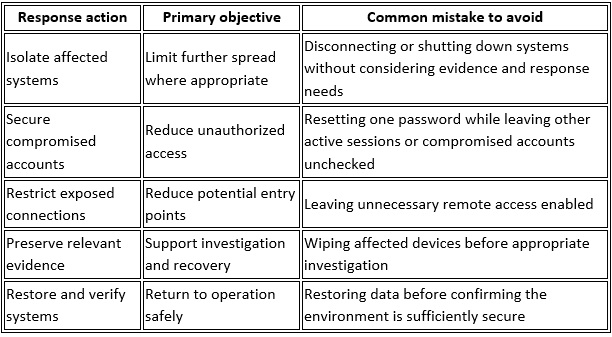
Assign responsibilities in advance and review the plan periodically. During a serious incident, involve qualified security professionals and follow applicable reporting obligations.
18. Review Third-Party Access
Vendors, consultants, software providers, and other partners may have access to business systems or information. Keep a record of these connections and the permissions granted.
Confirm that access is still necessary, limit privileges, and remove accounts when a relationship ends. Review third-party security practices according to the sensitivity of the information they handle.
19. Secure Physical Equipment
Protect computers, servers, networking equipment, and mobile devices against theft and unauthorized use. Use physical access controls where appropriate, lock unattended devices, and keep equipment in secure locations.
Maintain an inventory of business devices and establish procedures for lost equipment. Remote locking or device tracking can help where supported and appropriately configured.
20. Review Security Controls Regularly
Cybersecurity requires ongoing attention. Review account permissions, backup results, software updates, endpoint alerts, remote access, and incident response procedures on a defined schedule.
Assign an owner to each control and document outstanding issues. Revisit the checklist after significant technology changes, new business requirements, security incidents, or changes to the workforce.
How Can a Small Business Put This Checklist Into Practice?
Trying to implement all 20 controls at once can be difficult. Start with a review of existing protections, then prioritize gaps based on business risk.
A practical starting sequence is:
1. Secure access: Enable MFA, strengthen passwords, and review administrator accounts.
2. Protect systems: Update software, secure devices, and review remote access.
3. Protect business data: Check backup coverage, restoration procedures, and permissions.
4. Improve detection: Confirm how security alerts are monitored, investigated, and escalated.
5. Prepare employees: Provide security awareness training and establish clear reporting procedures.
6. Document responsibilities: Assign owners and set dates for reviewing each control.
The right priorities depend on the business's systems, data, regulatory obligations, and risk exposure. Keep a record of completed actions and unresolved gaps so progress can be measured over time.
Strengthen Your Small Business Security With BBComputing
Small businesses do not always have an internal IT team to manage every aspect of cybersecurity. A managed IT provider can help organize technology management, maintain security controls, and provide support aligned with business needs.
BBComputing provides managed IT services for small businesses, typically those with 3 to 50 employees. Based in Chicago and serving clients across the country, the company offers helpdesk support Monday through Friday, 8 a.m. to 5 p.m. Central, with after-hours escalation for urgent issues.
Its services include 24/7 automated monitoring of managed devices and managed endpoint detection and response (EDR) and identity threat detection for Microsoft 365 accounts, backed by a 24/7 security operations center (SOC) that investigates and responds to threats. Security awareness training and Microsoft 365 backup are also available.
The right combination of services depends on your environment and requirements. A review of your current setup can help identify gaps, clarify responsibilities, and determine which improvements deserve attention first.
Contact BBComputing to discuss your business IT and security needs and develop a practical plan for strengthening your defenses.
Frequently Asked Questions
What is the most important cybersecurity control for a small business?
There is no single control that addresses every risk. Multi-factor authentication is an important starting point because it adds protection to accounts even when passwords are compromised. Pair it with timely updates, secure backups, endpoint protection, and employee training.
How often should a small business update its cybersecurity checklist?
Review the checklist at least annually and more frequently when business needs or risks warrant it. Also revisit it after a security incident, major technology change, new remote access requirement, or significant change in staff responsibilities.
Can a small business manage cybersecurity without dedicated IT staff?
A small business can implement many foundational controls using built-in technology features, clear procedures, and employee training. However, monitoring, investigation, incident response, and recovery can require specialized expertise. A managed IT provider can help cover relevant responsibilities based on the agreed service scope.
What is the 3-2-1 backup strategy?
The 3-2-1 strategy recommends keeping three copies of important data, using two types of storage media, with at least one copy stored offsite. Businesses should also protect backups from unauthorized changes and test recovery regularly. Additional safeguards may be appropriate for ransomware resilience and business continuity.
What are the most common cybersecurity risks for small businesses?
Common risks include phishing, stolen credentials, unpatched software, compromised email accounts, insecure remote access, and inadequate backups. The level of risk varies by business, so a review of systems and security practices can help determine which gaps to address first.
What are small business security controls?
Small business security controls are safeguards designed to reduce the likelihood or impact of cyber incidents. Examples include MFA, endpoint protection, encryption, firewalls, access restrictions, backups, security monitoring, and incident response planning. Used together and reviewed regularly, these controls help businesses manage cybersecurity more consistently.