
Managed IT services help small businesses maintain their technology, support employees, and manage IT security without building a complete internal IT department. Before choosing a provider, however, business owners need to understand the potential cost and what they will receive for their monthly investment.
The managed IT services cost depends on the number of users and devices, the level of support, the security tools included, and the complexity of the business's IT environment. Understanding these factors helps you compare proposals and identify a service plan that fits your operational needs.
How Much Do Managed IT Services Cost?
Managed IT services providers use different pricing models, so there is no single rate that applies to every business. One useful reference is Kaseya's MSP Pricing: A Guide to Managed IT Services Pricing, which discusses findings from its 2023 Global MSP Benchmark Survey.
According to Kaseya's survey, among resp
ondents offering per-user pricing, 22% charged between $50 and $100 per user per month, 17% charged between $101 and $150, and 11% charged between $151 and $200. These figures describe surveyed providers' pricing bands, rather than a universal average or a guarantee of what a particular business will pay.
Source: Kaseya, MSP Pricing: A Guide to Managed IT Services Pricing.
For budgeting purposes, businesses should use these figures and obtain current proposals based on their required services. A quote for basic IT support may not be directly comparable with one that includes advanced endpoint security, identity protection, backup, and more extensive coverage.
What Factors Affect Managed IT Services Pricing?
Several factors influence the total cost of managed IT services for small business.
1. Number of Users and Devices
The size of your team and the technology it uses can affect your monthly fee. Some providers charge per user, while others charge per device or use a combination of both models.
Per-user pricing can be convenient when employees use multiple devices. Per-device pricing may be easier to understand when a business has a relatively fixed inventory of computers, servers, and other equipment.
Before signing an agreement, confirm how employees, shared workstations, mobile devices, servers, and newly added equipment will be counted.
2. Scope of IT Support
The services included in a plan can make a significant difference to its price. A basic package may cover routine troubleshooting and device maintenance, while a broader managed service may include proactive monitoring, software updates, user administration, and cybersecurity support.
Ask providers to specify which activities are included in the monthly fee and which are charged separately. This makes it easier to compare proposals based on actual coverage rather than price alone.
3. Cybersecurity Requirements
Businesses have different security needs depending on the information they handle, the applications they use, and their exposure to cyber threats.
A plan may include basic endpoint protection, while a more comprehensive service may include managed endpoint detection and response, identity threat detection, security monitoring, or employee awareness training.
Clarify which security capabilities are included, how alerts are investigated, and what happens when a threat is identified. Advanced security requirements can increase the overall cost, but the right investment depends on the business's risks and obligations.
4. Support Hours and Response Requirements
Support availability is another pricing consideration. Some businesses need assistance during standard business hours, while others require agreed escalation procedures for urgent issues outside those hours.
When comparing providers, distinguish between helpdesk availability, automated monitoring, and security operations. These are different functions and should not be treated as interchangeable.
Review the service agreement for support hours, escalation procedures, response targets, and any additional charges associated with extended coverage.
5. Existing IT Infrastructure
The condition and complexity of your current environment can affect the cost of onboarding and ongoing support. Outdated equipment, undocumented systems, inconsistent security settings, and unsupported software may require additional work before a provider can manage the environment effectively.
Ask whether the proposal includes an initial assessment, remediation work, migration assistance, or other setup activities. These costs may be separate from the recurring monthly fee.
What Are the Common Managed IT Pricing Models?
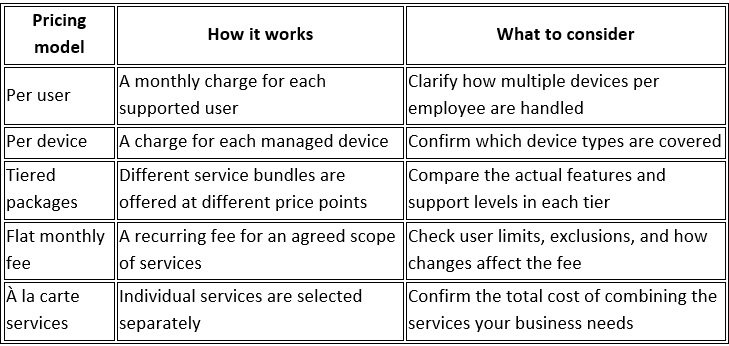
Kaseya's pricing guide discusses these models and notes that providers use different approaches based on their services and business requirements. The best model for your organization depends on how your technology environment is structured and how predictable you need your IT budget to be.
Managed IT Services vs. Break-Fix Support
Break-fix support generally means contacting a technician when an IT problem occurs and paying for the work performed. Managed IT services use an ongoing service arrangement that can include monitoring, maintenance, user support, and agreed security services.
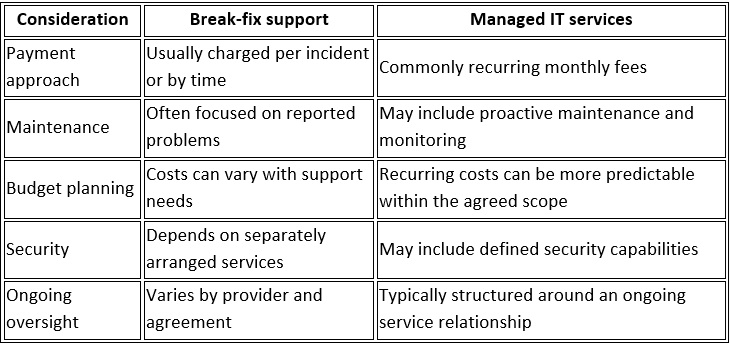
Neither model is automatically right for every business. A company with limited support needs may prefer on-demand assistance, while a growing organization that depends on reliable systems and consistent security practices may benefit from a managed service arrangement.
Managed services do not eliminate every outage or cybersecurity risk. Their value depends on the services delivered, how well they match the business's needs, and how effectively the provider manages the environment.
How Can You Get Better Value From Managed IT Services?
Choosing the lowest quote does not necessarily mean choosing the best service. Evaluate the scope and practical value of each proposal before making a decision.
· Document your requirements. List your users, devices, applications, support needs, and security priorities.
· Compare equivalent proposals. Check whether each provider includes the same support hours, monitoring, backup, and security services.
· Review exclusions. Ask about project work, hardware, software licensing, onboarding, and other potential additional charges.
· Understand service levels. Review response targets, escalation procedures, and how urgent issues are handled.
· Ask about reporting. Find out how the provider communicates completed work, recurring issues, and recommendations.
· Plan for growth. Confirm how pricing changes when you add employees, devices, or business locations.
These steps help you evaluate managed IT services pricing in the context of what your business actually needs, rather than comparing monthly fees without considering the scope.
Managed IT Services for Small Businesses at BBComputing
BBComputing provides managed IT services for small businesses, typically supporting organizations with 3 to 50 employees. Based in Chicago, the company serves businesses across the country.
Its services include helpdesk support Monday through Friday, 8 a.m. to 5 p.m. Central, with after-hours escalation for urgent issues. BBComputing also provides 24/7 automated monitoring of managed devices, managed endpoint detection and response (EDR), and Microsoft 365 identity threat detection backed by a 24/7 security operations center (SOC) that investigates and responds to threats.
Security awareness training and Microsoft 365 backup are also available. As a Microsoft partner, BBComputing can help businesses assess their IT needs and determine which services are appropriate for their environment.
The right service scope depends on your team, technology, and operational requirements. Contact BBComputing to set up a review of your environment and about a suitable service arrangement.
Frequently Asked Questions
How much do managed IT services cost per user?
Pricing varies by provider and service scope. Kaseya's 2023 survey reported that 22% of respondents offering per-user pricing charged $50 to $100 per user per month, while other respondents charged higher or lower amounts and request current quotes for a reliable budget.
Are managed IT services worth it for a small business?
They can be valuable when a business needs ongoing technical support, proactive maintenance, and defined security services without employing a full internal IT team. Whether the investment makes sense depends on the business's requirements, risks, and the services included in the agreement.
What is usually included in managed IT services?
Depending on the provider and agreement, services may include helpdesk support, device monitoring, maintenance, user and device management, cybersecurity, and backup services. Always review the actual service scope because not every package includes every capability.
Is per-user or per-device pricing better?
Per-user pricing can simplify budgeting when employees use several devices. Per-device pricing may be suitable when equipment counts are relatively stable or when shared systems are common. Compare the total cost and included services under both models before deciding.
Are setup fees separate from monthly managed IT costs?
They can be. Some providers charge separately for onboarding, initial assessments, migrations, or remediation work. Ask for all one-time and recurring charges to be listed in the proposal.
How can a small business compare managed IT providers?
Compare the services included, support hours, security capabilities, response targets, exclusions, reporting, and contract terms. Request written proposals that cover the same requirements so you can make an informed comparison.
Understanding managed IT services cost starts with knowing what your business needs and what each provider will deliver. By reviewing pricing models, service scope, and potential additional charges, you can make a more informed decision about ongoing IT support.