
A cybersecurity incident can disrupt business operations, expose sensitive information, and affect customer trust. For small businesses with limited internal IT resources, responding without a clear process can make an already difficult situation harder to manage.
A cybersecurity incident response plan gives employees and decision-makers a documented process for identifying potential threats, coordinating the response, limiting damage, and restoring operations. It helps everyone understand their responsibilities before an incident occurs.
This guide explains how to create an incident response plan, which procedures to include, and how to keep the plan useful as your business and technology change.
What Is a Cybersecurity Incident Response Plan?
A cybersecurity incident response plan is a written set of procedures that explains how an organization will handle suspected or confirmed security incidents. These may include phishing attacks, compromised email accounts, ransomware, unauthorized access, data exposure, or malware infections.
The plan identifies who should be notified, who makes decisions, how affected systems should be handled, and what steps are needed to investigate and recover.
An effective plan should answer five questions:
· Who is responsible for coordinating the response?
· How should employees report suspicious activity?
· What steps should be taken to contain the incident?
· How will the business protect evidence and determine the scope of the incident?
· Who authorizes recovery and communicates with affected parties?
The procedures should reflect the business's systems, risks, available resources, and legal or contractual obligations.
Why Is an Incident Response Plan Essential for Your Business?
Preparation helps businesses respond more consistently when a security issue occurs. Without documented procedures, employees may delay reporting an incident, take conflicting actions, or overlook systems and accounts that need attention.
A structured response plan can help a business:
· Limit disruption: Establish clear steps for containing an incident and prioritizing critical operations.
· Coordinate decisions: Assign responsibilities so employees know who can approve actions and communicate updates.
· Protect evidence: Reduce the risk of losing information needed to investigate what happened.
· Support recovery: Define how systems and data should be checked before they return to normal use.
· Meet applicable obligations: Identify who evaluates legal, regulatory, contractual, and notification requirements.
· Improve future readiness: Document lessons learned and use them to strengthen security controls.
A response plan cannot prevent every incident or guarantee that downtime and losses will be avoided. Its purpose is to help the organization respond in an organized, timely, and risk-aware manner.
Key Stages of the Incident Response Lifecycle
An incident response lifecycle provides a framework for preparing, detecting, containing, and recovering from security incidents. The exact process may vary depending on the incident and the organization's security arrangements.
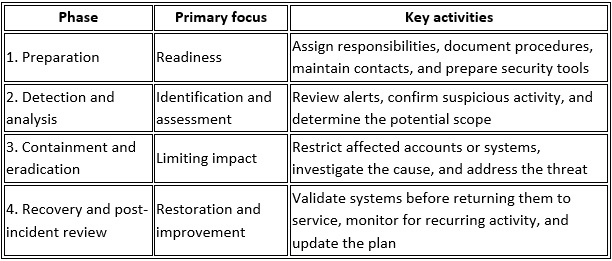
These phases may overlap. For example, a team may need to contain a threat while continuing to determine which accounts and devices are affected.
Step-by-Step Guide: How to Create an Incident Response Plan
1. Assemble Your Incident Response Team
Identify the people responsible for coordinating and carrying out the response. In a small business, one person may hold more than one role, but each responsibility should be clearly assigned.
Your response team may include:
· Incident coordinator: Organizes activities, tracks decisions, and manages the response timeline.
· IT or security contact: Assesses technical alerts, affected devices, accounts, and systems.
· Business decision-maker: Approves significant operational decisions and resource allocation.
· Communications contact: Coordinates internal updates and approved external communications.
· Legal, privacy, or insurance contacts: Help evaluate notification obligations, policy requirements, and other relevant considerations.
Document primary and backup contacts. Include the process for contacting external IT or security providers when internal expertise is unavailable.
2. Identify Critical Systems and Data
Your team needs to know what it is protecting before an incident occurs. Create an inventory of important systems, applications, devices, accounts, and data.
Identify which services the business relies on most, such as Microsoft 365, financial applications, customer databases, file storage, and operational systems.
For each critical asset, document:
· The business owner or responsible contact.
· Where the system or data is hosted.
· Who has administrative access.
· Which other systems depend on it.
· How it is backed up and restored.
· The business impact if it becomes unavailable or compromised.
This information helps the team prioritize investigation, containment, and recovery.
3. Define How Incidents Are Detected and Reported
Employees should know how to report a suspicious email, unexpected login notification, missing device, unusual account activity, or suspected malware infection.
Set up a clear reporting channel and identify who reviews incoming reports. Document how security alerts from endpoint protection, Microsoft 365, and other systems are escalated.
For managed endpoint detection and response (EDR), clarify who receives alerts, who investigates them, and how response actions are coordinated. Automated monitoring can identify suspicious activity, while investigation and response require appropriate processes and assigned responsibility.
Include a simple rule for employees: report suspected incidents promptly, even if they are unsure whether an alert is genuine. Early reporting gives the response team more time to assess the situation.
4. Establish Containment Procedures
Containment aims to limit the impact of a suspected or confirmed incident while the team investigates it.
Depending on the situation, actions may include:
· Isolating an affected device from the network.
· Disabling or restricting a compromised account.
· Revoking suspicious sessions or access tokens.
· Blocking a malicious connection or removing unnecessary remote access.
· Restricting access to affected applications or data.
· Coordinating with security specialists before making changes that could affect evidence.
Do not assume that one action is appropriate for every incident. For example, immediately powering off a device or deleting files may remove useful evidence or complicate investigation. Follow established procedures and seek qualified security guidance when needed.
5. Investigate the Incident and Preserve Evidence
After initial containment, determine what happened, which systems and accounts may be affected, and whether unauthorized access or data exposure occurred.
Record the timeline, alerts, actions taken, people involved, and decisions made. Preserve relevant logs and evidence according to your procedures and applicable requirements.
The investigation should consider:
· The suspected entry point.
· Accounts, devices, and applications involved.
· Whether credentials or sensitive information were exposed.
· Whether the attacker may still have access.
· Whether other systems show related activity.
· What needs to be addressed before recovery begins.
Keep records in a secure location with appropriate access restrictions. If legal, regulatory, insurance, or law-enforcement involvement may be necessary, coordinate with the appropriate professionals.
6. Remove the Threat and Address the Cause
Once the incident has been investigated sufficiently to guide remediation, address the vulnerabilities and unauthorized access involved.
Possible actions include removing malicious software, applying security updates, correcting configuration weaknesses, resetting compromised credentials, revoking unauthorized access, and reviewing affected accounts.
Do not treat deleting a suspicious file or changing one password as proof that an incident is resolved. The team should consider whether persistence mechanisms, additional compromised accounts, or other affected systems remain.
Document the corrective actions taken and the checks required before systems can return to normal operation.
7. Restore Systems and Verify Their Security
Recovery should return affected systems and business services to operation in a controlled manner.
Before restoring data or reconnecting systems, verify that the immediate threat has been addressed and that the recovery environment is appropriate for use. Restore from known-good backups where necessary and confirm that critical applications and data are functioning as expected.
Your recovery procedures should define:
· Which systems take priority.
· Who approves restoration.
· Which backup sources are available.
· How restored systems will be tested.
· What monitoring is needed after recovery.
· How employees will be informed that services are available again.
Recovery times depend on the incident's scope, the condition of the systems, backup quality, and available resources. Test restoration procedures in advance rather than assuming backups will work during an emergency.
8. Plan Internal and External Communications
Decide how the business will communicate during an incident. Employees need clear instructions, while customers, suppliers, insurers, regulators, or other parties may need updates depending on the circumstances.
The plan should identify who approves communications, which channels are authorized, and how information is documented.
Avoid speculative statements about the cause or impact while the investigation is ongoing. Notification requirements and deadlines vary by jurisdiction, industry, contract, and the type of information involved. Consult appropriate legal or privacy professionals to determine which obligations apply.
9. Conduct a Post-Incident Review
After the incident has been contained and the business has moved into recovery, review how the response worked.
Discuss what was detected, how quickly the issue was escalated, which decisions helped, and where delays or gaps occurred. Identify whether the incident exposed weaknesses in access controls, backups, monitoring, training, or communication.
Record specific improvements, assign an owner to each action, and set a target date for completion. The goal is to turn the experience into practical changes rather than simply document what happened.
10. Test and Update the Plan
A plan is only useful if employees understand it and the contact information and procedures remain current.
Schedule tabletop exercises in which the team walks through a realistic scenario, such as a compromised Microsoft 365 account or a ransomware alert. These exercises help identify unclear responsibilities and missing information without requiring a live security incident.
Review the plan when your business adopts major technology changes, changes providers, adds critical applications, or updates its security arrangements. Revisit it after an actual incident or exercise to incorporate lessons learned.
Incident Response Plan Checklist
Use this checklist to confirm that your plan covers the essentials.
Response team roles and backup contacts are documented.
Critical systems, applications, accounts, and data are identified.
Employees know how to report suspicious activity.
Security alerts have a defined review and escalation process.
Containment procedures account for different incident types.
Evidence preservation and incident documentation steps are included.
Credential resets and access revocation procedures are defined.
Backup restoration and system validation procedures are documented.
Internal and external communication responsibilities are assigned.
Applicable reporting, legal, contractual, and insurance obligations can be assessed.
The plan has been tested and updated.
Follow-up actions have assigned owners.
How BBComputing Can Support Your Business Security
Small businesses may not have dedicated internal security staff to manage every aspect of threat detection and response. A managed IT provider can help maintain systems, support users, and strengthen the security controls that form part of an incident response strategy.
BBComputing supports small businesses, typically those with 3 to 50 employees. Based in Chicago and serving clients nationwide, its helpdesk operates Monday through Friday, 8 a.m. to 5 p.m. Central, with after-hours escalation for urgent issues.
Its services include 24/7 automated monitoring of managed devices, managed endpoint detection and response (EDR), and identity threat detection for Microsoft 365 accounts. These security services are backed by a 24/7 security operations center (SOC) that investigates and responds to threats. Security awareness training and Microsoft 365 backup are also available.
A strong incident response plan should define how these capabilities fit into the business's wider procedures, including reporting, decision-making, evidence handling, communications, and recovery. Service responsibilities should be documented so employees know whom to contact and what to expect when an incident occurs.
Contact BBComputing to discuss your IT and security needs and identify practical steps to strengthen your business's readiness for a cybersecurity incident.
Frequently Asked Questions
What is the main goal of an incident response plan?
The main goal is to provide a coordinated process for identifying, containing, investigating, and recovering from security incidents. It assigns responsibilities, supports informed decisions, and helps the business manage operational and information risks.
Who should be on an incident response team?
The team should include a coordinator, an IT or security contact, a business decision-maker, and a communications contact. Legal, privacy, insurance, or external security specialists may also need to be involved, depending on the incident and the organization's obligations.
How often should an incident response plan be tested?
Test the plan periodically and after significant changes to systems, responsibilities, or business operations. Tabletop exercises can help identify gaps in communication and decision-making. The appropriate schedule depends on the business's risks and requirements.
What is the difference between incident response and disaster recovery?
Incident response focuses on identifying, investigating, containing, and addressing a security incident. Disaster recovery focuses on restoring systems, applications, and data after a disruptive event. The two processes overlap when a cyber incident causes systems or data to become unavailable.
What is the preparation phase in incident response?
Preparation takes place before an incident. It includes assigning roles, identifying critical assets, documenting procedures, maintaining contact information, establishing alert and reporting processes, protecting backups, and practicing response scenarios.
Can a small business create an incident response plan without an internal security team?
Yes. A small business can document its responsibilities, reporting process, critical systems, and recovery procedures with help from its IT provider or a qualified security professional. The plan should identify which tasks employees can handle and when specialized support is needed.
Does an incident response plan guarantee that a business will avoid data loss?
No. A plan helps coordinate the response but cannot guarantee that every threat will be contained or that all data can be recovered. Appropriate security controls, protected backups, tested recovery procedures, and timely investigation all contribute to better incident readiness.