
Microsoft Edge continues to redefine user experiences. This is due to Microsoft’s commitment to innovation. The latest updates bring a host of features. These are designed to enhance productivity, security, and browsing satisfaction.
Chrome may have been number one for years. But Edge has been steadily gaining popularity. It is now the third most popular browser worldwide. Overtaking Firefox a while back, it’s now just behind Chrome (1) and Safari (2).
From personalized workspaces to a built-in VPN, Microsoft Edge is more than a browser. It’s a comprehensive toolkit for users navigating the online environment. Let’s delve into the newest Microsoft Edge features. They promise to elevate your online process.
A New Era of Productivity: Microsoft Edge Workspaces
Introduction to Workspaces
Workspaces in Microsoft Edge represent a paradigm shift. A shift in how users organize and manage their online tasks. Imagine having a dedicated space for each project. One that reliably integrates relevant tabs, documents, and websites.
Microsoft Edge Workspaces makes this a reality. It allows users to create custom workspaces. Each workspace represents different aspects of their digital lives. Whether you’re working on a project, planning a trip, or pursuing a hobby. Workspaces offer a specific and organized browsing environment.
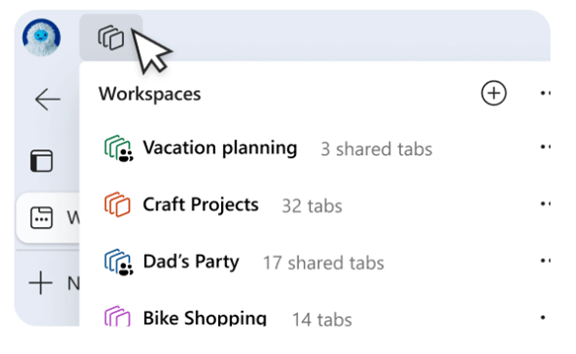
Key Features of Microsoft Edge Workspaces
- Personalization: Users can customize Workspaces with a unique name and color. This makes it easier to distinguish between different projects or activities.
- Easy Access: With a single click, users can switch between Workspaces. This instantly transitions them between different sets of tabs and online resources. Users associate each Workspace with specific projects or interests.
- Persistence: Workspaces keep their configurations. This is the case even when users close and reopen the browser. This ensures that users can reliably resume their work. There is no need to reconstruct their customized environments each time.
- Efficient Task Management: Workspaces make task-focused browsing easier, minimizing distractions. This helps users maintain focus on the specific project or activity at hand.
Enhanced Security with Edge Secure Network VPN
Built-in VPN
Microsoft Edge takes a giant leap in prioritizing user privacy and security. The Edge Secure Network uses a new built-in VPN. VPNs, or Virtual Private Networks, encrypt internet connections. This helps ensure a secure and private browsing experience. Microsoft Edge now provides users with 5GB of free VPN data per month. This further protects their online presence.